
Reviews, 1 on 1s, and 360s in one place
Run review cycles with manager sign-off, keep 1 on 1s moving, collect 360° feedback, and find finished work in Records, without stitching forms, email, and spreadsheets together.
Includes passwordless login, role-based access, unlimited retention of submitted review history, and priority support.
Built around the jobs you need done
Same end-to-end product, framed the way HR and managers actually work.
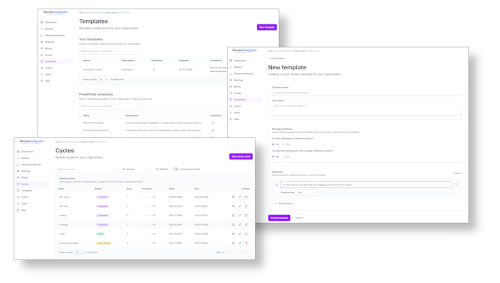
- Design reviews once, reuse every cycle
- Build templates with text, choice, and star-rating questions. Optionally add manager feedback. Start from the prebuilt library or create forms that match your process.
- Assign by team, not by spreadsheet
- Create review cycles, assign a template to each team, and track progress from draft through completion, with unlimited cycles and assignments.
- Hold managers accountable with sign-off
- Employees submit from their dashboard. Managers sign off with optional feedback and ratings. Employees acknowledge so the review is truly complete.
- Keep everyone in the loop
- Dashboard notifications when a cycle or 360 begins, when a 1 on 1 is waiting, and when a manager signs off, so next steps are visible without chasing email.
- See progress and history org-wide
- Cycle and team progress, searchable Records for finished work, run history, and cycle comparisons. Advanced reporting adds rating trends, distribution, and team comparisons.
- Control access by role
- Owners, admins, HR, managers, billing, and employees each get the right view. Import and export users via CSV for bulk setup.
Beyond the review cycle
1 on 1s, 360° reviews, and Records
The work between seasons stays in the same product: meetings with follow-through, multi-perspective feedback, and a place to find what already finished.
1 on 1s
Managers run 1 on 1s with people on the teams they manage, without a side process in docs or calendar notes.
- Create a 1 on 1 with one person or a whole team you manage
- Both people begin the meeting, keep private notes, and complete when they are done
- Action items carry forward so the next meeting starts from what was promised
- Prior notes and action items are visible in the meeting, then the finished 1 on 1 lands in Records
360° reviews
Run multi-perspective feedback as its own workflow, not a second spreadsheet next to the annual cycle.
- Choose subjects individually or by team, with a required self-review
- Optionally collect manager, coworker, and direct-report feedback on their own templates
- Set how many reviewers per role and whether that role stays anonymous
- When a run begins, reviewers are chosen at random from the subject’s managers, teammates, and the people they manage
Records
Finished cycle reviews, 1 on 1s, and 360s live in one searchable list instead of folders, inboxes, and exports.
- Filter by type, search by name, and narrow results by team
- Employees see their own completed work
- Managers see records for teams they manage, plus their own
- Owners, admins, and HR can browse the organization and open a record to read it in context
Template library
Start from real review types
Launch with prebuilt templates for common review seasons, or build your own with text, choice, and star-rating questions. Optional manager feedback sections keep sign-off structured. The same templates can power cycle reviews and 360° reviewer roles. Submitted answers stay tied to the form as of submission so history remains intact when templates evolve.
- Quarterly Performance Review
- 360 Peer Feedback
- Goals & OKR Review
- Probationary Period Review
- Stay Interview
- Upward Feedback
- Sales Performance Review
- Leadership & Management Review
Reporting
Progress today, intelligence across seasons
Know who’s submitted and who’s stalled. Look up completed reviews in Records, browse run history, and compare cycles. When you need deeper performance intelligence, advanced reporting covers rating trends, distribution, and team comparisons.
- Cycle and team completion without chasing email
- Searchable Records and run history across past seasons
- Rating trends, distribution, and team comparisons
Administration
Org-wide visibility and control
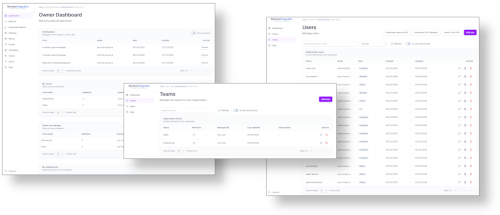
Role-based dashboards keep owners, admins, HR, and managers oriented. Manage teams and users, track assignments, and run cycles, 1 on 1s, and 360s without switching tools. Records respects the same roles, so managers see their teams and employees see their own history.
- Role-based dashboards for every stakeholder
- Team and user management in one place
- Records scoped to org, managed teams, or yourself
See it in your next review season
Start a free trial and run cycles, 1 on 1s, and 360s with manager sign-off and Records you can search later.